How TeraContext.AI Works
The complete pre-construction pipeline — from RFP upload to GC proposal. TeraContext.AI takes your construction specification PDFs and drawing sets, automatically extracts and classifies their contents against industry-standard WBS taxonomies, and provides a complete workflow for generating subcontractor scope packages, managing bids, and assembling GC proposal responses.
Upload your documents
Drag and drop your files — the platform handles the rest. Upload spec volumes as Specification and drawing sets as Drawing; the type controls which AI pipeline runs on each document. Large spec books (1,000+ pages) may take 10–20 minutes to fully process, and you can upload more documents at any time, even while others are processing.
Document types
- Specification — your main spec book (this is what gets classified)
- Drawing — architectural, structural, MEP drawing sets
- Addendum — revisions to the original RFP
- Contract, Geotechnical, Bid Form, Other — supporting documents
File formats
- DOCX
- XLSX
- PPTX
- Markdown
- HTML
- CSV
- PNG
- JPG
- TIFF
…and more.
Seven phases, run automatically on every document
- PDF ExtractionText is extracted from every page
- Table ExtractionTables are identified and converted to structured data
- Section SplittingSpec sections are identified by format (e.g., "SECTION 03 30 00"); for drawings, title blocks and text content are extracted
- EmbeddingEach section is converted to searchable vectors for AI retrieval
- WBS ClassificationAI classifies each section against the project's WBS taxonomy
- Graph BuildingCross-reference relationships are mapped
- Cross-Ref ValidationClassifications are validated for consistency
Real-time progress tracking shows the status of each phase for every document.
Review & classify
Once the AI has classified your spec sections, your team reviews the results. Each classification shows the assigned WBS code, confidence score, and classification method. Bulk operations let you confirm high-confidence classifications instantly — typically 70–80% of sections — while your estimators focus their time on edge cases and low-confidence items.
The AI does the heavy lifting. Your team makes the final call before scope packages are built.
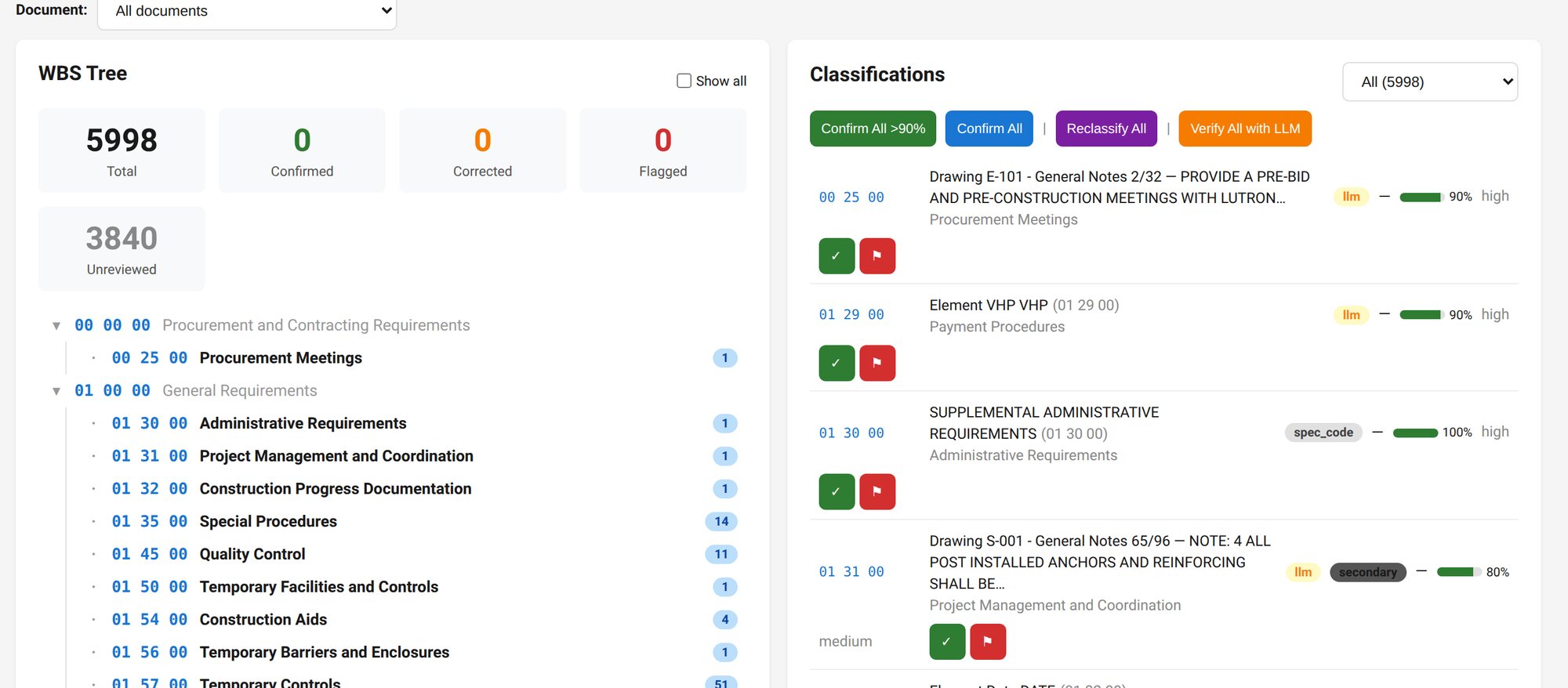
11 industry-standard WBS formats
TeraContext.AI works with 11 industry-standard WBS taxonomies, including:
| Taxonomy | Use case |
|---|---|
| Commercial spec division format | The 50-division (00–49) section numbering used in most North American commercial project manuals |
| UFGS | Unified Facilities Guide Specifications (DoD projects) |
| PennDOT-408 | PennDOT Publication 408 — Pennsylvania DOT highway construction specifications (Sections 100–1200) |
| FERC Generation | Utility/power generation |
| EPRI GN-COA | Power industry cost accounts |
| DOE Nuclear | Department of Energy nuclear projects |
| DOE Buildings | DOE building construction |
| NAHB Residential | Residential construction |
Public-domain taxonomies (UFGS, PennDOT-408, FERC Generation, DOE Nuclear, DOE Buildings) are included. Customers provide their own data for licensed taxonomies and use the option to upload their own taxonomy.
Custom taxonomies: clone any standard taxonomy and customize it — add, rename, delete, or reorganize codes to match your firm's classification system.
Scope packages
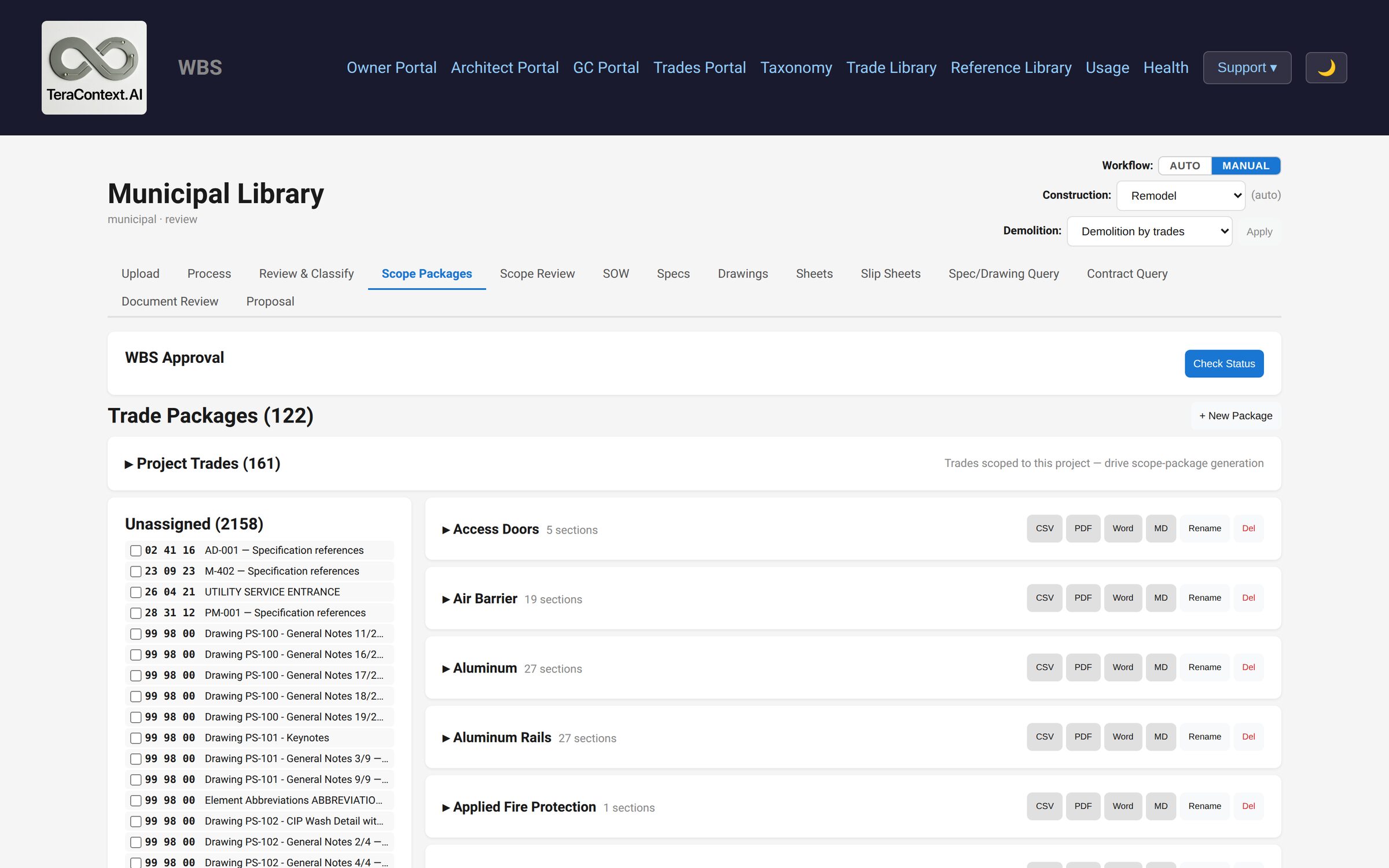
Once classifications are approved, the platform bundles spec sections into trade-specific packages for subcontractor bidding. Auto-generate one package per division as a starting point, then customize — move sections between packages, rename, split, or merge until the scope breakdown matches how you actually bid.
Export each package as CSV, PDF, Word, or Markdown — ready to send to your subs.
Per-trade statements of work
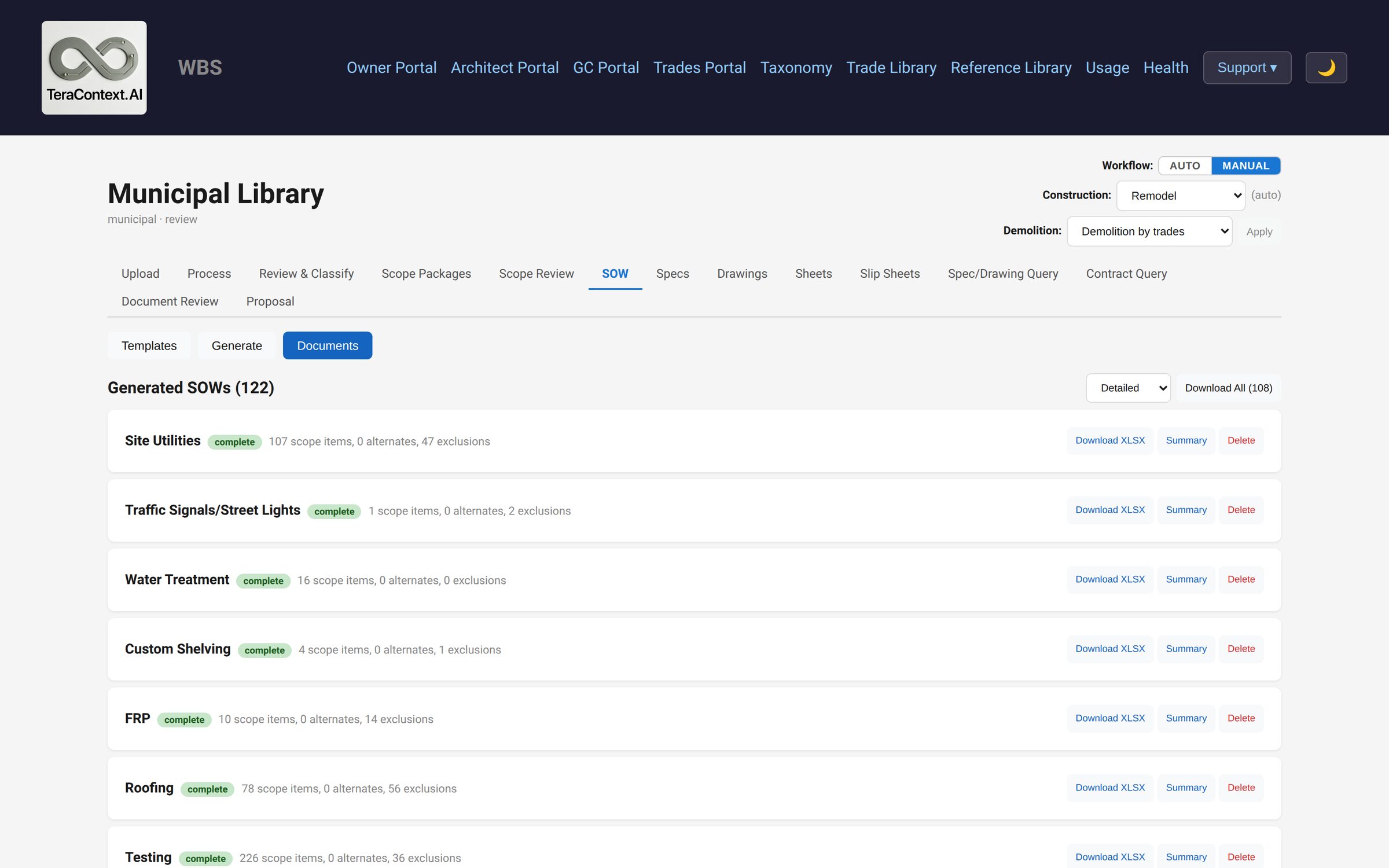
Supply your trade list and your firm's own SOW template, and the platform generates one Statement of Work per trade — the document each subcontractor bids against, in your format and with your logo.
Task items are extracted from each spec section and attributed to exactly one trade. An item pulled from one trade's section but assigned to another automatically becomes the first trade's exclusion and the second trade's scope — no double-counting across trades, and nothing silently dropped between them. Download each SOW as an .xlsx, or every SOW at once as a ZIP.
Drawing analysis
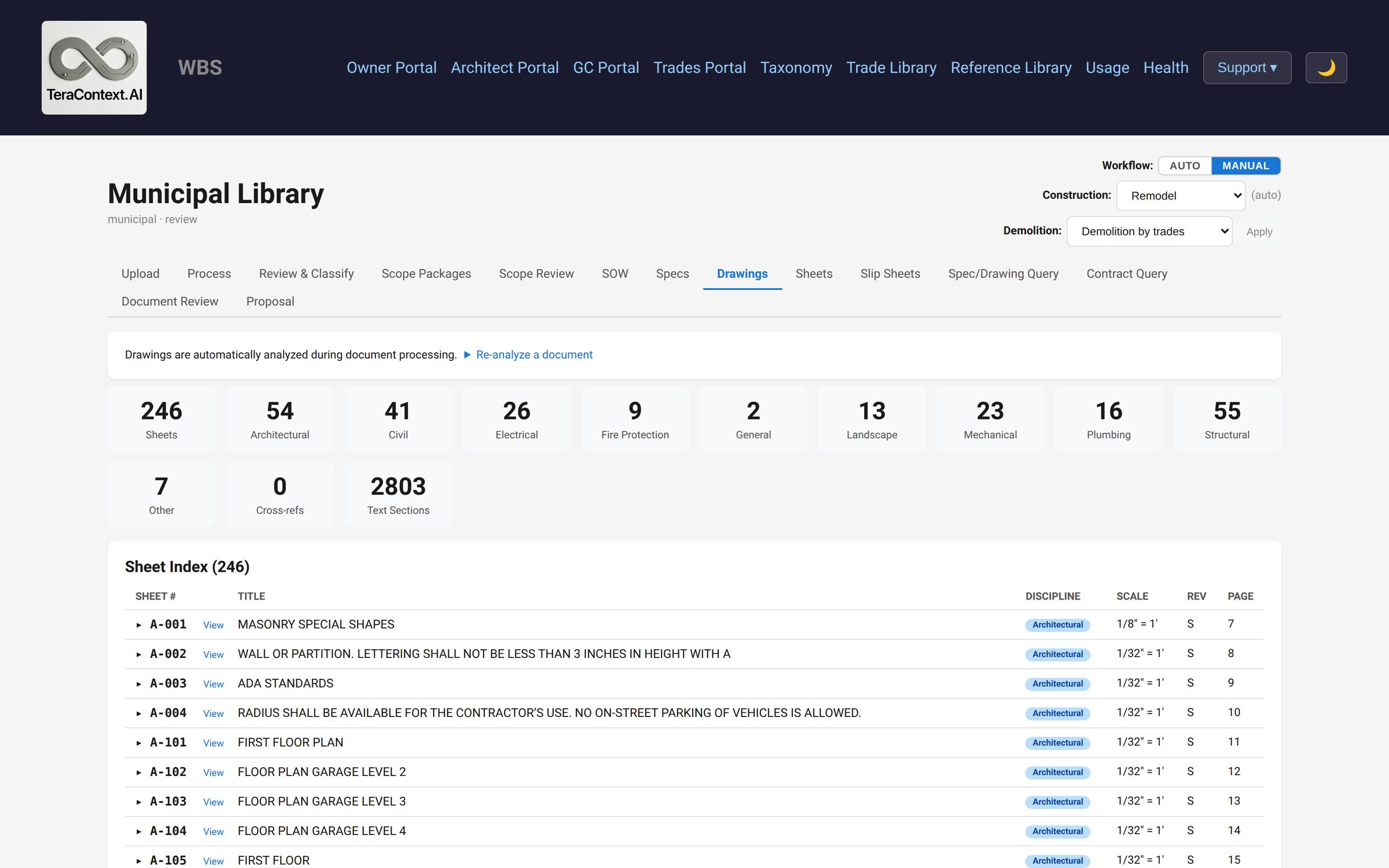
When you upload drawing sets, a vision LLM analyzes every page — extracting sheet numbers, titles, disciplines, general notes, keynotes, schedules, legends, and material callouts. Cross-references between drawings and spec sections are mapped automatically, both by explicit reference and by discipline.
All extracted text becomes searchable alongside your specifications.
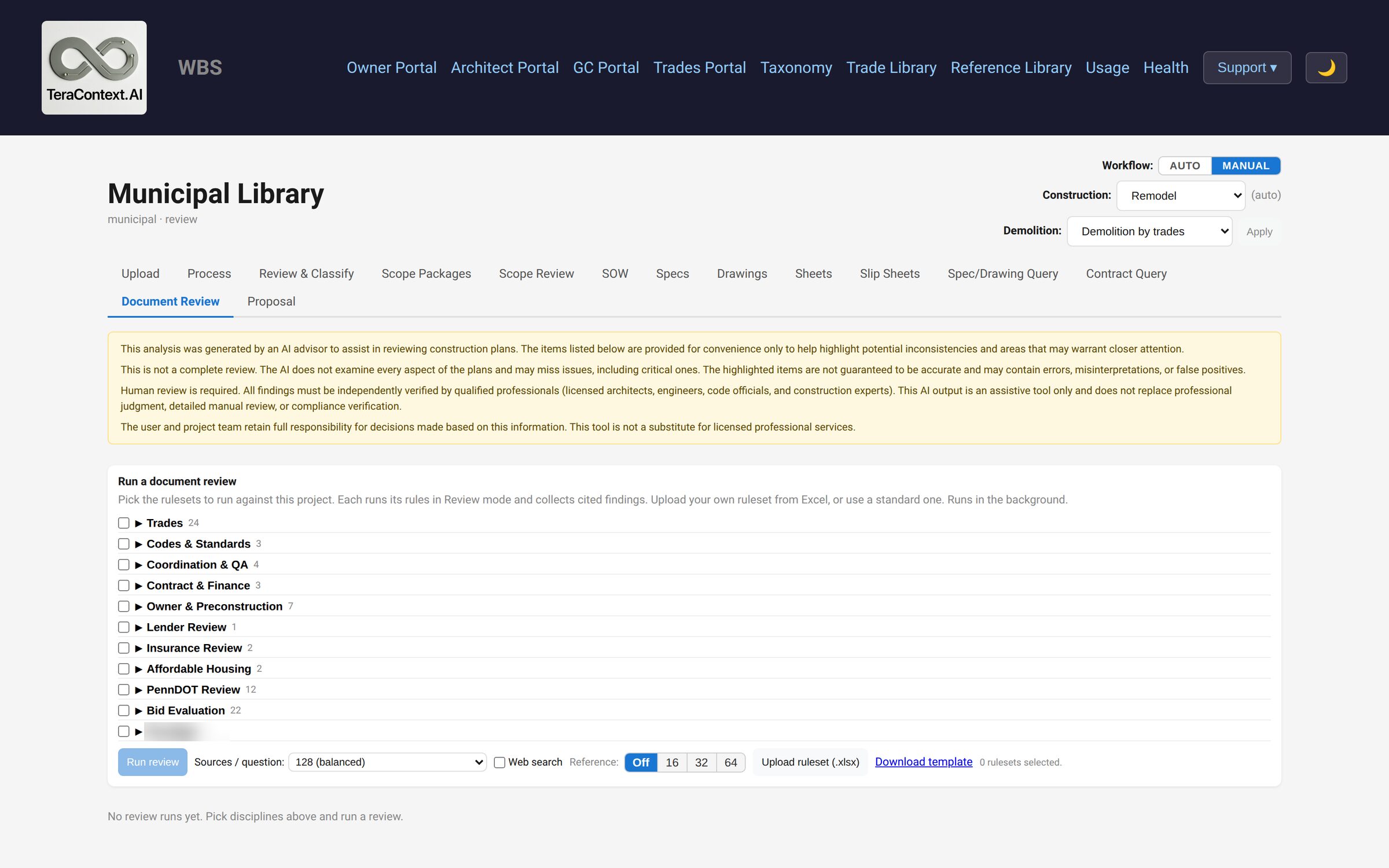
Document review
Automated constructability and coordination checks flag spec–drawing conflicts, missing information, ambiguities, code gaps, and delegated-design responsibilities before the bid goes out — turning a processed bid set into a punch list of questions to ask the architect.
Every check is a plain-language rule. Rules are grouped into rulesets by trade, plus cross-discipline rulesets for spec completeness, code compliance, and coordination. For each rule the system retrieves the relevant spec sections and drawings and asks a reasoning model to find the issues. Bring your own rulesets from Excel.
Ask the spec book
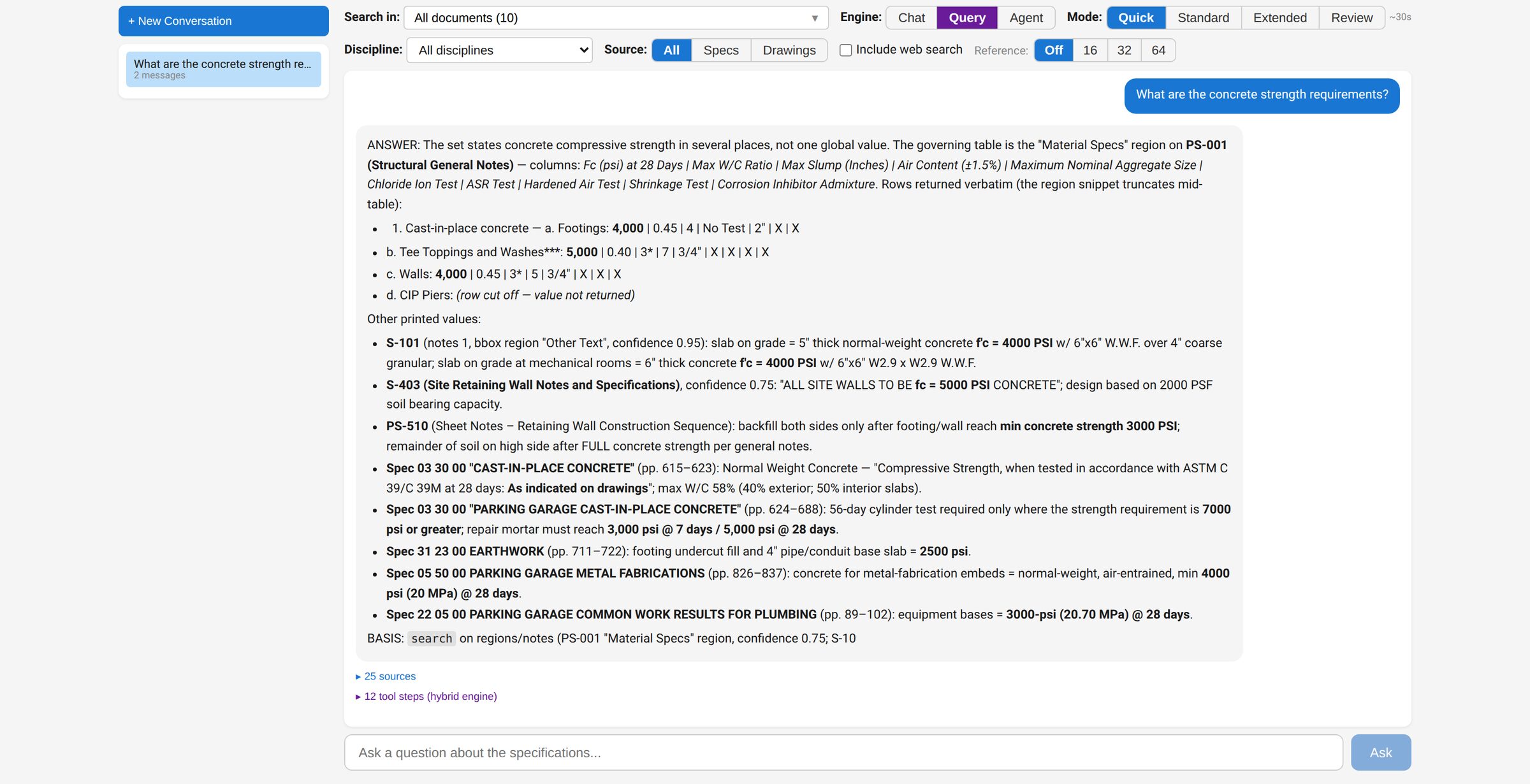
Ask natural language questions against your specs and drawings. Answers come with source citations — spec section codes, drawing numbers, and page references. Choose the depth: Quick (about 30 seconds) for lookups, Standard (about 60 seconds) for most requirements, Extended (about 2 minutes) for exhaustive extraction, or Review (3–4 minutes) for deep constructability analysis.
Bid management & proposal assembly
Bid management
Build your subcontractor directory across 29 standard construction trades. Invite subs to bid on specific scope packages, record their responses, and compare bids side-by-side.
For deeper analysis, upload a sub's bid response document. The AI evaluates it for scope coverage, exclusions, alternates, qualifications, and risk flags — catching the buried exclusions that manual review misses.
Proposal assembly
Assemble accepted sub bids into a complete GC proposal response. The platform generates a coverage matrix, gap analysis, per-trade narratives, and executive summary. Run a compliance check against the original RFP before submission. Export as PDF or Word for final editing.
Specialized AI for the scale of construction documents
Retrieval-Augmented Generation (RAG)
Semantic search optimized for industry-standard WBS structure, creating searchable vector indexes of your entire document collection.
GraphRAG
Knowledge graphs that capture relationships between specs, drawings, standards, and codes.
Multi-layer summarization
Hierarchical document understanding from division-level overviews down to individual spec sections.
Vision LLM
Multimodal AI that reads drawing pages, extracting title blocks, general notes, keynotes, and annotations directly from the sheet images.
Supported project types
- Multi-Family
- Office
- Municipal
- Parking
- Retail
- Hotel
- Strip Mall
- Mixed Use
- Other
Want the details on one page? See the Product Datasheet.